
Inbound Response
WhatsApp Sales Agent
An agent on WhatsApp that receives an enquiry, logs the contact, loads a live service catalogue from Postgres and runs a real conversation with per-contact memory. It checks calendar availability, books the call and notifies the team. It never messages anyone first.
The situation
Enquiries arrive at all hours. Someone has to read them, qualify them and book a call — during working hours only, and only if they are not already busy with something else. Somebody messages at ten at night and hears back on Monday, if anyone remembers. That enquiry was not lost to a bad process. It was lost to a slow one.
The workflow
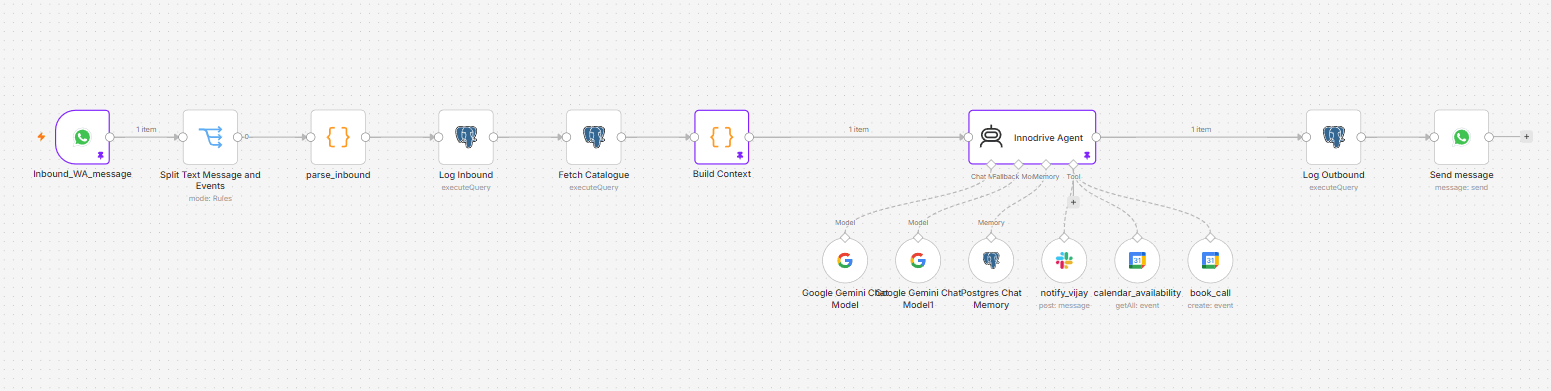
What it does
- 01
Message trigger
Receives inbound message webhooks from the messaging channel.
- 02
Event filter
Routes real user messages onward and drops delivery and read receipts, so the agent never reacts to its own traffic.
- 03
Parser
Flattens the webhook payload down to sender id, name, message id and text.
- 04
Inbound logging
Upserts the contact and records the inbound message before anything else runs.
- 05
Fetch catalogue
Loads the active services, with their capabilities and proof, from the database.
- 06
Build context
Assembles the system prompt, injecting the catalogue, the current date and the contact's name.
- 07
Agent
Runs the conversation and decides which tools to call.
- 08
Chat memory
Per-contact conversation memory, keyed by the sender, so a thread picks up where it left off instead of starting over.
- 09
Agent tools
Calendar availability, calendar booking and team notification.
- 10
Send reply
Delivers the agent's reply back to the prospect.
- 11
Error workflow
Any failed run alerts the team. A silent failure on an inbound channel is indistinguishable from having no enquiries.
The decision that mattered
The catalogue lives in the database, not in the prompt.
Adding a service is a row in a table, not a change to the agent. Your team extends what it can sell without coming back to me — and the prompt stays short enough to stay reliable, which matters more than it sounds: a catalogue pasted into a system prompt grows until the model starts quietly ignoring the middle of it. The tables are ordinary ones, and the agent reads them at the start of every conversation.
Guardrails
It never messages anyone first.
- Reactive only. It replies, and it does not initiate.
- Replies stay inside the messaging provider's service window.
- It discloses that it is AI.
- It always offers a path to a person.
- Any failed run alerts the team rather than failing quietly.
The data model
The catalogue is data-driven. Extend it by adding rows; the workflow does not change.
- services
- technologies
- service_technologies
- use_cases — capabilities and case studies
- contacts
- messages
- chat memory
Stack
- Messaging
- WhatsApp Business Cloud API
- Database
- Postgres
- Reasoning
- LLM provider
- Scheduling
- Calendar service
- Notifications
- Slack
- Orchestration
- n8n
- Ingress
- Public HTTPS endpoint
What this page does not cover
- Set per deployment: business number, database connection, model key, calendar, team channel, public webhook URL and encryption key.
- The conversation design and the qualifying criteria are written against your services. They are not carried over from another deployment.
- A dedicated business number is required. It cannot share a number a person is already answering on.
Built for your business
Your catalogue, your calendar, your team.
The sequence stays the same. What changes is the catalogue it sells from, the calendar it books into and the channel it alerts. Because the catalogue is a table rather than a prompt, your team extends what it can sell without coming back to me. A first conversation costs nothing, and I will tell you on it whether this is worth building for you.